
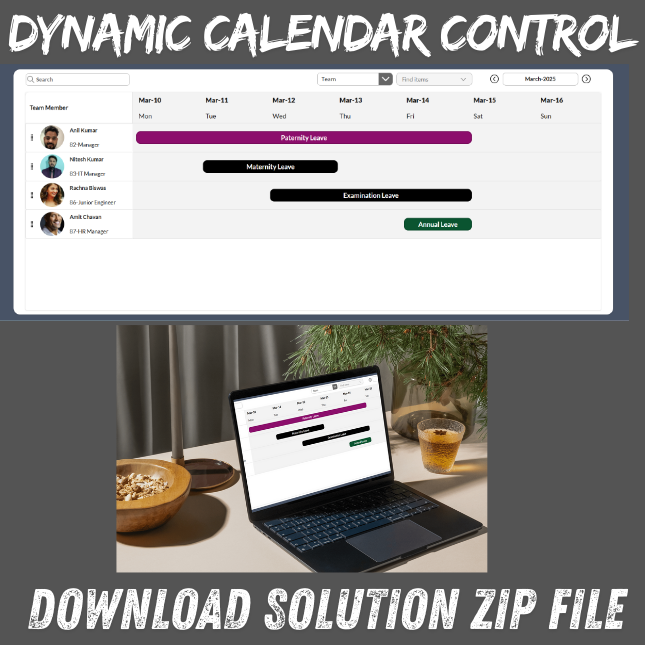


Download Code Solution for Dynamic Calendar Control in Power Apps (Desktop & Tablet Only)
This professional solution provides a fully functional Dynamic Calendar Control for Power Apps, built specifically for desktop and tablet screen layouts. The calendar helps you visually track employee availability, leave status, and blocked dates with ease.
The solution uses SharePoint as the primary backend, but can be quickly reconnected to Dataverse, SQL Server, Excel, or other PowerApps-supported data sources.
🔥 Key Features
-
Dynamic monthly calendar display
-
Desktop and tablet-optimized design
-
Displays current, previous, and next month dates
-
Click a date to view related details
-
Integrates with SharePoint, Dataverse, SQL, Excel, and more
-
Shows team availability and approved leaves
-
Automatically blocks leave dates on the calendar
-
Easily customizable look, feel, and behavior
-
Minimal and clean formulas for easy maintenance
💼 Use Case Examples
Perfect for apps where teams or departments need a visual schedule, such as:
-
Employee leave and absence tracking
-
Team availability dashboards
-
PTO and vacation management
-
Resource and project planning
-
Shift allocation
-
Booking systems
-
Date-based approvals and schedules
📦 What’s Included
-
Importable PowerApps ZIP solution
-
Prebuilt calendar functionality
-
Start-to-finish setup instructions
-
Sample SharePoint structure for quick integration
🛠 Backend Compatibility
Although the included setup uses SharePoint Lists, the solution can also connect to:
-
Microsoft Dataverse
-
SQL Server
-
Excel files
-
Any other supported connector
Just change the data binding and it’s ready to use.
💻 Device Compatibility
This solution is intended for:
-
Desktop apps
-
Tablet apps
(Not optimized for mobile screens.)
🚀 Why This Will Save You Time
Manually building a working calendar in PowerApps can take days. This solution already includes:
-
Date calculations
-
Navigation controls
-
Layout formatting
-
Leave visualization
-
Backend integration
Simply import, connect your list/table, and you’re ready to go.
Note: I provide paid support to install the application.
The purchase includes the application files only.
If you want deployment or installation in your tenant, it is a paid add-on service, and the installation fee is $50 USD per tenant.

Steev –
I recently downloaded the Dynamic Calendar Control solution for PowerApps, and I’m genuinely impressed with how smoothly it works. The installation process was extremely simple — I imported the solution file into my PowerApps environment, and within minutes, the control was ready to use without any complications.
Functionally, the calendar works perfectly. It’s responsive, visually clean, and highly interactive. The navigation between months is seamless, the UI is modern, and the control integrates easily with data sources for events, bookings, and reminders. Customization was also effortless, making it very developer-friendly.
Overall, this Dynamic Calendar Control is an excellent, ready-to-use component that saves a lot of development time. Highly recommended for anyone looking to add a professional, feature-rich calendar experience to their PowerApps application.